택핏(Tacfit)

육체적 에너지를 위한 운동방법은 택핏을 배우기 전과 후로 나뉜다. 10여년전 웨이트 개인레슨을 받고, 다시 시작하면서 한계를 느껴 다른 방법을 찾아보다 기능성운동, 타바타, 택핏을 알게되었다. 시작한건 2015년 9월.

기존 웨이트 운동은 근력에 중점을 두고 있으나, 기능성 운동을 하면서 흉추와 고관절의 가동성 및 안정성에 관심을 갖게 되었다. 택핏을 만든 스콧새넌이 소셜계정에 올린 자료들이 있어서 모아본다.

택핏이 크로스핏과 다른점

Alpha

Bravo

Charlie

Delta

Tacfit Echo (Delta level)

Golf

Foxtrot

Juliet

Hotel

November

Mike

Lima

Kilo

India

Tacit Uniform

Tacfit Romeo

Tacifit Quebec

Tacit PAPA

Oscar

Scorpion push up

Correct your Hip Tightness

View this post on Instagram

Correct your Hip Tightness: The relationship of between your psoas, your breath and your trunk twist determine your hip's ability to internally rotate (1). In 1998, I created the Shinbox positions and transitions (recently repackaged as the "90-90" by some doing it incorrectly). I designed the Shinbox as a diagnostic of hip rotation to correct imbalance from rotational bias (primarily from excessive sitting and postural dysfunctions). Use my Mobility Ring as an assistance tool to gently "Steering Wheel" back and forth in an extended shinbox. Coupled with an exhale, you can aid the release of hip tightness, due to the signal it sends the nervous system when exposing the tension chain between trunk twist and internal hip rotation. Next, isolating the trunk twist in a hip bridge can be achieved with the aid of a Mobility Ring, since without, unilateral "cheats" cause you to think you're fully rotating but actually hide your inner unit restrictions. Finally, I teach you a micro-flow to counter excessive sitting. One or two repetitions per side will both release most issues before they form, and reveal precisely which range in the relationship between trunk twist and hip rotation has become restricted. #scottsonnon #mobilityring #mobility #nmap #rmaxinternational #511tactical @the_mobility_ring www.mobilityring.com #mobilityneuroscience 1. www.jospt.org/doi/full/10.2519/jospt.2013.4292?code=jospt-site

A post shared by Scott Sonnon (@scott_sonnon) on

횡경막

View this post on Instagram

BUILD THE INNER UNIT: Stop focusing your weightlifting on the "outer unit" of musculature. You may build a bigger chassis, but it will be incapable of optimal efficiency. Doing so may make you stronger, but it will cost you increasingly more energy for the same output and/or create dysfunctional asymmetries that will eventually create pain and injury. Instead, lift to build a better "bellow" – whoever breathes the most efficiently, ultimately builds the most sustainable (unbroken) machine, which leaks the least force. Concentrate on weightlifting to optimize access to the "canister" of air inside you, since your strength and endurance come from the brain's utilization of oxygen. Lift to balance the symmetry of your current outer unit so that you can restore and augment optimal flow of the "inner unit" of that bottle of air. Stop concentrating on running, swimming or cycling with "proper technique", because you cannot achieve your optimized aerodynamic and hydrodynamic form until you change your inner unit for optimal ventilation. The science of physiology evolved from dissecting cadavers and looking at the parts, so now, you exercise by trying to strengthen those parts to build a better whole. Exercise physiology as a result is failing to lower injuries and lengthen lives. Instead, train the whole to build a better ventilation (and better fat utilization as primary fuel by the brain, not glucose). Then, you not only avoid the highest rate of training-related injuries in history, but you create an ecosystem of forces that are botanically optimized to coexist and endure for the longest duration of high yield performance. #scottsonnon #nmap #mobilityneuroscience #mobility

A post shared by Scott Sonnon (@scott_sonnon) on

신경과 고통

비만

View this post on Instagram

Not all helpful messages are positive. Despite the message of the masses who comprise those suffering metabolic diseases, if what you're doing is unhealthy, if you're participating in the behaviors which have made obesity, diabetes and heart disease top five killers, you're not "perfect as you are." You are not even okay, as what you're doing is not a decision between equal choices. You're making low quality decisions. "Thin" has been derogated by those who are unable to restrain addictive behaviors long enough to discover that: It is easier to build up from thin, than down from fat. "Fat" is the physiological symptom from a cluster of unhealthy behaviors which activates genetic disposition to obesity and (type 2) diabetes. Even if you don't exercise except for normal activity, it's less dangerous (in other words, it's healthier) to be thin than fat. Normal "Thin" which results from the evolutionarily stable longevity strategy of under-eating (differentiated from the body-mass loss resulting from eating disorder) doesn't come with a host of chemical addictions and hormonal changes like carrying excess fat. Yet, since the masses want psychological justification for indulgent behaviors, they often demonize those who are thin, despite thinness being statistically healthier, safer and easier to become fitter. The reality is that most indigenous cultures, and the longest living populations, practice under-eating. So, if you want practical advice: if you become thin from under eating, you're more likely to live longer, do more, and build stronger than if you choose behaviors which increase excess fat. You may not like this message, but a health professional should have a moral obligation to counter the media message which repeatedly bombards you

A post shared by Scott Sonnon (@scott_sonnon) on

SixDegreeflow

SixDegreeflow.com

Clubbell

Running

View this post on Instagram

PART I: There is a tsunami of bad form in fitness promoted even by "medical" professionals. The belief is that because an individual has medical licensure, then anything they promote must be accurate. Medical licensure is specific and contextual to educational foci. They can be wrong and often are (hence, second opinions). There is a new generation of physiotherapist, chiropractor and health professional who believe and espouse that any movement is better than no movement; an anti-stability sentiment. Having observed this industry and even pioneered the disciplines of mobility and flow twenty years ago, I am appalled at how far the pendulum has swung the opposite direction. This is not what my work was intended to promote, so when I see them promoting to "always stay mobile" and "never stop being in flow" I want to say: stop it. Three decades ago, we were mired in an anti-mobility epoch, where "stabilization" was the favored mode and synonymous with health. Removing movement freedom was believed to improve bodily strength. Tension lay at the opposite pole from velocity, so more movement decreases strength. That's true, but it was polarized, and eventually imprisoned movement. Now, the work of myself and others of my era, is being perverted into a polarized, unbalanced radicalization of mobility and flow. It appears more like a sociological shift to a belief in greater liberty versus security; exactly the same shift that believes we should have less securities and more freedoms, and that they should be protected when they perceive their freedoms endangered. The problem is that without security, there is no stability Freedom isn't free: liberty derives from the WORK done by the stable components. READ PART II in next photo.

A post shared by Scott Sonnon (@scott_sonnon) on

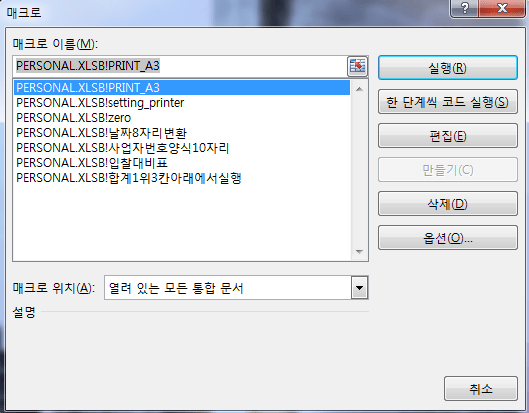
사용중인 매크로들 170809

반복적인 작업은 매크로를 세팅해놓으면 도움이 된다. 전체자동화보다는 각각 사용할수 있게 모듈로 나누어놓는게 나은듯

절대참조, 상대참조를 이해하고 간단하게 기록한 다음 불필요한 구문을 삭제,수정하면 된다.

(code를 포스팅 할경우 ``` 는   의 형식을 갖게 되고, <pre> </pre>는 제일 하단 서식의 형식을 갖게된다. 

입찰대비표 data

1. 양식변환

<br />Sub 입찰대비표()
'
' 입찰대비표 매크로
'

'
    Columns("H:I").Select
    Range("I1").Activate
    Selection.EntireColumn.Hidden = True
    Rows("4:5").Select
    With Selection.Interior
        .Pattern = xlSolid
        .PatternColorIndex = xlAutomatic
        .Color = 49407
        .TintAndShade = 0
        .PatternTintAndShade = 0
    End With
    With Selection.Interior
        .Pattern = xlSolid
        .PatternColorIndex = xlAutomatic
        .Color = 65535
        .TintAndShade = 0
        .PatternTintAndShade = 0
    End With
    Range("A6").Select
    ActiveWindow.DisplayZeros = False
End Sub

2. 비율등 입력

<br />Sub 합계1위3칸아래에서실행()
'
' 합계1위3칸아래에서실행 매크로
'

'
    ActiveCell.FormulaR1C1 = "=R[-3]C/R[-3]C[-10]"
    ActiveCell.Offset(2, 0).Range("A1").Select
    ActiveCell.FormulaR1C1 = "=R[-5]C[-10]-R[-5]C"
    ActiveCell.Offset(-2, 8).Range("A1").Select
    ActiveCell.FormulaR1C1 = "=R[-3]C/R[-3]C[-18]"
    ActiveCell.Offset(2, 0).Range("A1").Select
    ActiveCell.FormulaR1C1 = "=R[-5]C[-18]-R[-5]C"
    ActiveCell.Offset(-2, 8).Range("A1").Select
    ActiveCell.FormulaR1C1 = "=R[-3]C/R[-3]C[-26]"
    ActiveCell.Offset(2, 0).Range("A1").Select
    ActiveCell.FormulaR1C1 = "=R[-5]C[-26]-R[-5]C"
    ActiveCell.Offset(-2, 8).Range("A1").Select
    ActiveCell.FormulaR1C1 = "=R[-3]C/R[-3]C[-34]"
    ActiveCell.Offset(2, 0).Range("A1").Select
    ActiveCell.FormulaR1C1 = "=R[-5]C[-34]-R[-5]C"
    ActiveCell.Offset(-2, 8).Range("A1").Select
    ActiveCell.FormulaR1C1 = "=R[-3]C/R[-3]C[-42]"
    ActiveCell.Offset(2, 0).Range("A1").Select
    ActiveCell.FormulaR1C1 = "=R[-5]C[-42]-R[-5]C"
    ActiveCell.Offset(-2, 0).Rows("1:1").EntireRow.Select
    Selection.Style = "Percent"
    Selection.NumberFormatLocal = "0.0%"
    ActiveCell.Select
    Range("F6").Select
    ActiveWindow.FreezePanes = True
End Sub

분석 및 서식 추가 필요

자주쓰는 것들

날짜의 경우는 data 함수를 사용해서 yy, mm, dd 를 지정해주는 방법이 더 나았다.

<br />Sub zero()
'
' zero 매크로
'

'
    ActiveWindow.DisplayZeros = False
End Sub

Sub 사업자번호양식10자리()
'
' 사업자번호양식10자리 매크로
'

'
    ActiveCell.FormulaR1C1 = "=LEFT(RC[-1],3)&-MID(RC[-1],4,2)&-RIGHT(RC[-1],5)"

End Sub


Sub 날짜8자리변환()
'
' 날짜8자리변환 매크로
'

'
    ActiveCell.FormulaR1C1 = "=LEFT(RC[-1],4)&-MID(RC[-1],5,2)&-RIGHT(RC[-1],2)"

End Sub

출력

출력시 하단에 파일명, 탭명, 페이지 입력

<br />'
' PRINT_A3 매크로
'

'
    Application.PrintCommunication = False
    With ActiveSheet.PageSetup
        .PrintTitleRows = ""
        .PrintTitleColumns = ""
    End With
    Application.PrintCommunication = True
    ActiveSheet.PageSetup.PrintArea = ""
    Application.PrintCommunication = False
    With ActiveSheet.PageSetup
        .LeftFooter = "&F"
        .CenterFooter = "&A"
        .RightFooter = "&P / &N"
        .Orientation = xlLandscape
        .PaperSize = xlPaperA3
        .FirstPageNumber = xlAutomatic
        .Order = xlDownThenOver
        .BlackAndWhite = False
        .Zoom = False
        .FitToPagesWide = 1
        .FitToPagesTall = False
        .PrintErrors = xlPrintErrorsDisplayed
        .OddAndEvenPagesHeaderFooter = False
        .DifferentFirstPageHeaderFooter = False
        .ScaleWithDocHeaderFooter = True
        .AlignMarginsHeaderFooter = True
    End With
    Application.PrintCommunication = True
    Application.PrintCommunication = False
    With ActiveSheet.PageSetup
        .PrintTitleRows = "$4:$5"
        .PrintTitleColumns = ""
    End With
    Application.PrintCommunication = True
    ActiveSheet.PageSetup.PrintArea = ""
    Application.PrintCommunication = False
    With ActiveSheet.PageSetup
        .LeftHeader = ""
        .CenterHeader = ""
        .RightHeader = ""
        .LeftFooter = "&F"
        .CenterFooter = "&A"
        .RightFooter = "&P / &N"
        .PrintHeadings = False
        .PrintGridlines = False
        .PrintComments = xlPrintNoComments
        .PrintQuality = 600
        .CenterHorizontally = False
        .CenterVertically = False
        .Orientation = xlLandscape
        .Draft = False
        .PaperSize = xlPaperA3
        .FirstPageNumber = xlAutomatic
        .Order = xlDownThenOver
        .BlackAndWhite = False
        .Zoom = False
        .FitToPagesWide = 1
        .FitToPagesTall = False
    End With
    Application.PrintCommunication = True
    Range("A2").Select
End Sub

출력 두번째

Sub setting_printer()
'
' setting_printer 매크로
'

'
    Application.PrintCommunication = False
    With ActiveSheet.PageSetup
        .PrintTitleRows = "$4:$5"
        .PrintTitleColumns = ""
    End With
    Application.PrintCommunication = True
    ActiveSheet.PageSetup.PrintArea = ""
    Application.PrintCommunication = False
    With ActiveSheet.PageSetup
        .LeftHeader = ""
        .CenterHeader = ""
        .RightHeader = ""
        .LeftFooter = "&F"
        .CenterFooter = "&A"
        .RightFooter = "&P / &N"
        .LeftMargin = Application.InchesToPoints(0.708661417322835)
        .RightMargin = Application.InchesToPoints(0.708661417322835)
        .TopMargin = Application.InchesToPoints(0.748031496062992)
        .BottomMargin = Application.InchesToPoints(0.748031496062992)
        .HeaderMargin = Application.InchesToPoints(0.31496062992126)
        .FooterMargin = Application.InchesToPoints(0.31496062992126)
        .PrintHeadings = False
        .PrintGridlines = False
        .PrintComments = xlPrintNoComments
        .PrintQuality = 600
        .CenterHorizontally = False
        .CenterVertically = False
        .Orientation = xlLandscape
        .Draft = False
        .PaperSize = xlPaperA3
        .FirstPageNumber = xlAutomatic
        .Order = xlDownThenOver
        .BlackAndWhite = False
        .Zoom = False
        .FitToPagesWide = 1
        .FitToPagesTall = False
        .PrintErrors = xlPrintErrorsDisplayed
        .OddAndEvenPagesHeaderFooter = False
        .DifferentFirstPageHeaderFooter = False
        .ScaleWithDocHeaderFooter = True
        .AlignMarginsHeaderFooter = True
        .EvenPage.LeftHeader.Text = ""
        .EvenPage.CenterHeader.Text = ""
        .EvenPage.RightHeader.Text = ""
        .EvenPage.LeftFooter.Text = ""
        .EvenPage.CenterFooter.Text = ""
        .EvenPage.RightFooter.Text = ""
        .FirstPage.LeftHeader.Text = ""
        .FirstPage.CenterHeader.Text = ""
        .FirstPage.RightHeader.Text = ""
        .FirstPage.LeftFooter.Text = ""
        .FirstPage.CenterFooter.Text = ""
        .FirstPage.RightFooter.Text = ""
    End With
    Application.PrintCommunication = True
End Sub

같은 값 위아래 셀 합치기

매크로 (출처: seekseek 블로그)


Sub mergecell()
'
' AutoMerge Macro
'
' 바로 가기 키: Ctrl+k
'
On Error Resume Next
'ActiveCell.Select
rowcnt = ActiveCell.Row
colcnt = ActiveCell.Column
a = Cells(rowcnt, colcnt).Value
rowcnt2 = rowcnt + 1

'빈칸이면 끝
While Cells(rowcnt2, colcnt).Value  ""
    While a = Cells(rowcnt2, colcnt).Value '같은 값이면 계속증가
       Cells(rowcnt2, colcnt).Value = "" '같으니까 값을 지워주자 ㅎㅎㅎ
       '그래야 값이 둘인데 하나는 없어진다는 메시지 창이 뜨지 않는다.
       rowcnt2 = rowcnt2 + 1
    Wend
       '이제 같은 값구역을 병합
       Range(Cells(rowcnt, colcnt), Cells(rowcnt2 - 1, colcnt)).Select

       With Selection
            .HorizontalAlignment = xlCenter
            .VerticalAlignment = xlCenter
            .WrapText = False
            .Orientation = 0
            .AddIndent = False
            .IndentLevel = 0
            .ShrinkToFit = False
            .ReadingOrder = xlContext
            .MergeCells = False
        End With
        Selection.Merge (False)
        
        '초기화

        rowcnt = rowcnt2
        a = Cells(rowcnt, colcnt).Value
        rowcnt2 = rowcnt + 1
Wend
'
End Sub
조금만 더

아침에 문득

적당히 먹으면 생활에 에너지원이 된다고 하지만, 조금만 더 먹게 되는 것들이 살을 찌우게 된다.

아침에 눈을 뜨자마자 생각난 문구. 왜 그랬을까. 어제 자기전에 먹었던 ‘조금만 더’가 과했기 때문인것 같았다.

어떤 역치를 벗어나게 되는 ‘조금만 더’가 있어야 변화도 생기고 – 조금만 덜 이면 빠지겠지 – 일의 매무새도 수준있게 지을수 있어서 그 전체적인 수준을 높일 수도 있겠지.

Scene 1 : Grab on yourself

어떨땐말이야 이런 일 왜 하고 있나 싶을때가 있어. 가치를 알아보는 사람도 없고 같이 이야기 할 사람도 없고.

네가 하려는 일은 어느 지점에 갈때까지 계속 해야되는 일 아니었냐. 네 자신을 다잡고 꾸준히 해야하는 일

img_5041

Scene 2 : 하기

이젠 제 일에만 집중해서 하려구요. 전체적인 일에 신경쓰느라 정작 제 일이 밀리니 제 일은 부족함이 되고, 된 일들은 당연시 되구요.

해 줄 수 있는 일이라면 그냥 해주래이. 결국 다 돌아온데이. 하느님이 주신 달란트 하나님이 결정하신데이.

Scene 3 : 업

자업자득이라고 하죠. 자업. 좋은 업을 쌓아야죠. 하지만 바램이 있는 행동은 업이 아니에요. 그냥 할 뿐이죠.

img_1512

Life 사진전

100여장의 사진으로 표현된 근현대사. 각자의 스토리가 있고, 행동이 있고, 재능,열정,신념이 있었기에 각각 한장 한장의 사진이 빛을 발하는 것이리라.

img_5076

어떤 사진을 남길것인가.
어떤 행동을 실천할 것인가.

결국, 조금만 더 해보기로.